Subscription Management
Info
This only applies to custom subscriptions, i.e., a subscription created specifically for a user.
The subscription is then prefixed with the user name, e.g., swim_user.weather.aviation.metar.<uuid>.
This does not apply to public subscriptions, i.e., subscriptions starting with de-dwd..
Subscription Creation
To learn about how to create a subscription, refer to the Getting Started guide.
Subscription Lifecycle
Subscriptions can be in one of three states: ABSENT, ACTIVE, and PAUSED. These states determine the technical availability of the data queue. All state changes are communicated through Subscription Change Messages.
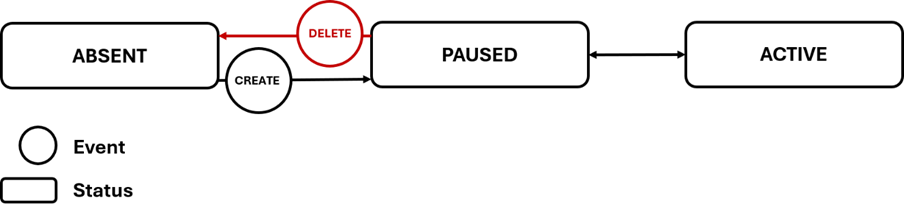
| State | Description |
|---|---|
| ACTIVE | The subscription is operational and delivers data. |
| PAUSED | The subscription can be connected to but does not receive any business data. It still receives technical or heartbeat messages. |
| ABSENT | The subscription is not available for connection. This may be the case before creation, after deletion or during a maintenance of the services. |
A change of subscription state may be requested by the consumer or initiated by the provider. The provider can change the state of a subscription at any time, but must inform the consumer about the change.
The typical lifecycle of a subscription consists of the following steps:
- Creation: the subscription is in the state
PAUSED. Consumers are informed via offline communication (email, phone, etc.) about the connection details. A Subscription Change Message informs about the creation of the subscription. - Data delivery: When ready to consume data, the consumer requests activation via an offline channel. The provider then sets the queue to
ACTIVEand confirms via a Subscription Change Message. - Pausing: The provider may transition the queue from
ACTIVEtoPAUSEDdue to maintenance, technical issues, or consumer requests. Planned maintenance is announced via a Scheduled Maintenance Message, withmaintenance-startandmaintenance-endevents sent at respective times. - Resuming: The provider may re-activate a
PAUSEDqueue, notifying the consumer via a Subscription Change Message. - Deletion: At the request of the customer the subscription may be deleted, which means to transition it from
PAUSEDtoABSENT.